
FACET ATLAS
Your product, as it really is. Not as the wiki remembers it.
One command opens your repository as a product map. See each feature’s requirements, its linked tests and differences between code and record. Ask Atlas AI about the code, or use plugins to propose changes such as wiki edits.
- READING RECORDSEvery record under docs/facets
- COUNTING FILESBefore any anchor is searched
- FINDING ANCHORSEach file, matched to its record
- share measured, not guessed
- src/checkout/discount.tscheckout/pricing/discount-codes
- src/checkout/cart.tsno anchor
- src/billing/trial.tsbilling/subscriptions/free-trial
- src/jobs/trial-reminder.tsbilling/subscriptions/free-trial
- web/pricing/PricingPage.tsxbilling/subscriptions/free-trial
- src/account/reset.tsaccount/access/password-reset
- config/billing/stripe.yamlbilling/subscriptions/free-trial
- src/search/recent.tsnavigation/search/recent-queries
- emails/trial-ending.mjmlbilling/subscriptions/free-trial
- src/account/export.tsaccount/profile/export-data
- src/library/playlist.tslibrary/playlist/create-playlist
- src/library/share.tsno anchor
THREE DEPTHS
From the whole product to one acceptance criterion. In two clicks.
Register, record, acceptance criterion. One path bar shows where you are; each level connects requirements with the available implementation and test evidence.
Redeem a discount code
A customer can enter one code at checkout and gets the specified discount — once, capped at 50 %, and not after it expires.
| A valid code lowers the total oncediscount.spec.ts +1 | named |
|---|---|
| An expired code is refuseddiscount.spec.ts +2 | named |
| The discount is capped at 50 %prop_cap_never_exceeded | named |
| Two codes don’t stack— | no test |
| A used code can’t be reusedredeem.it.ts | named |
- ANCHORED IN
- src/checkout/discount.ts changed
- ALSO ANCHORED IN
- config/billing.yaml
- OWNER
- checkout-pricing
- KNOWLEDGE
- 3 of 5 questions answered
Example: the three depths of a discount-code feature
SEVEN READERS
Not filtered. Rebuilt for whoever reads.
Leadership gets a report without one schema word. A developer gets a workbench. An agent gets raw data with null where nothing was counted. Nothing is hidden behind a role: what one leaves out, another shows, and the page says which.
REPORT
Where the product stands, in one sentence.
THIS WEEK
What changed
WATCH
What is at risk
OWNERS
Who holds what
OPEN
Questions without an owner
UNMEASURED
— shown as a dash
Leadership · in Atlas: Leitung
Where the product stands, in sentences. No “anchor”, no “proves”, no “record”.
LEAVES OUT
The acceptance-criteria ledger, the raw record, drift and anchors. Developer and Test & review show them.
Example layouts of the seven role surfaces · a plugin can add an eighth role
A dash where nobody counted. Not a zero.
Atlas does not make a number look better than what was measured. No percentage without its base, no progress bar that guesses. And “named by a test” says exactly that: a test entry refers to the acceptance criterion. Atlas does not run the test.
- MEASURED
0
acceptance criteria without a test
- UNMEASURED
— (dash: not measured)
nothing was counted here
- WITH ITS BASE
41 of 52
acceptance criteria linked to a test
- NOT DRAWN
79 %(struck through: Atlas does not draw it)a share with no base beside it
example values
ATLAS AI
An AI that knows your code. With access you control.
Atlas AI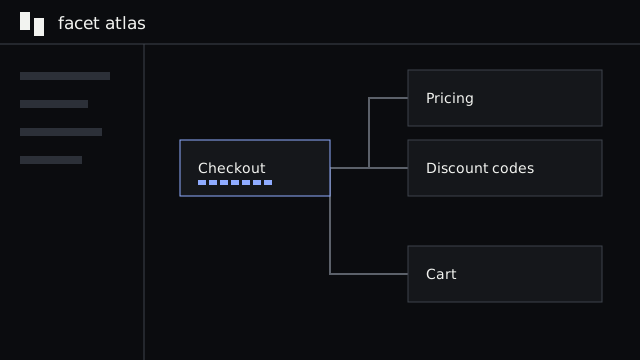 Atlas AI answers questions and drafts summaries using your existing sign-in; subscription use needs no extra FACET token purchase, while provider limits and any explicitly configured API billing still apply.View nowRead more here runs inside your repository, on your machine, signed in as you. Questions and generative tiles use the same account. Answers name their sources; plugin actions need separate AI grants, and measurements come from AtlasAtlas opens your repository as a product map, showing features, their requirements and the tests linked to them in your browser.View nowRead more here rather than a model.
All built-in AI features use your existing sign-in. With a supported subscription, you do not buy extra tokens from FACET; your provider’s plan limits still apply. A separately configured API key follows its provider’s billing.
/recordcheckout/pricing/discount-codes — does the code still keep this?Sonnet ▾
- searching records for discount-codes
- reading docs/facets/…/discount-codes.yaml
- reading src/checkout/discount.ts
- reading test/checkout/discount.spec.ts
The code implements four of five acceptance criteria. One is missing: the record says two codes don’t stack, but redeem() does not check for an existing code, and no test entry refers to that criterion.
Sources: src/checkout/discount.ts:14–31 · discount-codes.yaml · discount.spec.ts
example question and answer
GENERAL TOOLS DISABLED
BashBashOutputKillShellWriteEditNotebookEditTaskWebFetchWebSearchSlashCommand
These general-purpose tools are disabled by the command line. Atlas ignores the repository’s agent settings. A plugin may separately offer named actions to the AI, but only with an additional grant; allowing a wiki button does not grant that action to the AI.
PLUGINS
Your wiki, your decisions, your processes. Next to the code they describe.
Atlas can be flexibly extended with plugins. Add a wiki, architecture decisions or process diagrams beside your records. Each plugin adds the views and actions it needs; you decide which tools it may use.
Every call outside asks three questions first.
A plugin has no network of its own. It calls bus.call(tool, args); the host’s broker checks the manifest, then your grant, then runs it and logs it.
Wiki is calling repo.pr.
- PLUGINbus.call
- 1 · DECLARED?in its manifest
- 2 · GRANTED?by you, at install
- 3 · RUN + LOGhost tool or sidecar
- RESULTback to the plugin
HOST TOOLS
repo.state · repo.branch · repo.write · repo.commit · repo.prNamed by what they do, not by who asks. Writing a wiki page means a branch and a pull request, not a silent edit.SIDECARS
A plugin may bring its own binary: Confluence sync, a BPMN layout engine. Its checksum is measured at build and checked before every start. Credentials stay in your environment; the browser does not see them.
TOOLS FOR THE AI
A plugin can hand Atlas AI a tool, but only if you grant it for the AI separately. Granting the wiki its own write button does not hand that button to a model reading the wiki.
$ facet plugin add ./my-plugin.facetplugin$ facet plugin add github:owner/repo@tag$ facet plugin add https://…/plugin.zip --sha256 <sum>$ facet plugin list$ facet plugin update <id>$ facet plugin remove <id>$ facet plugin pack ./my-plugin
Install from a package file, a folder, a ZIP, an https:// address with its checksum, or a GitHub release. Every source passes the same seven checks before anything is unpacked into place.
LOCAL BY DESIGN
It runs where your code is. Nowhere else.
- 127.0.0.1
- facet ui listens on loopback only and checks the origin of every request.
- no Node
- The reader is embedded in the combined Atlas binary. No Node.js process is needed to run it.
- live
- Reload the page and it reads the repository again, so the view keeps up while you edit.
- your sign-in
- Atlas AI runs your own Claude Code on your machine. Your questions and the files it reads go to Anthropic through it, as with any Claude Code session.
- two languages
- English and German, light and dark, FACET and VS Code themes.
AND WHERE YOUR TEAM IS
Atlas in Jira and Confluence.
For people without a checkout: CI pushes a snapshot of the registry, and an Atlassian app shows it — records next to the ticket, macros in Confluence, read tools for AI clients. Nothing writes back.
[TICKET] · Expired codes are accepted
FACET · checkout/pricing/discount-codes
expired-code-rejected · named by 1 test
snapshot from CI
read only
example ticket
Start with the records.
Atlas reads the records you write with FACET Core. Every feature you describe today is on the map when Atlas is released.